
Publisher Studio

Everything you build survives the handover

Send a link or a single file, or put it on the screen in the room. It opens in any browser, and what arrives is the structure itself, still navigable and still in your colours.
Send
A link
Encrypted, revocable, and it opens on a phone.
Keep
One file
A single HTML file that works offline, for good.
Show
Present
The structure fills the screen and slowly turns.
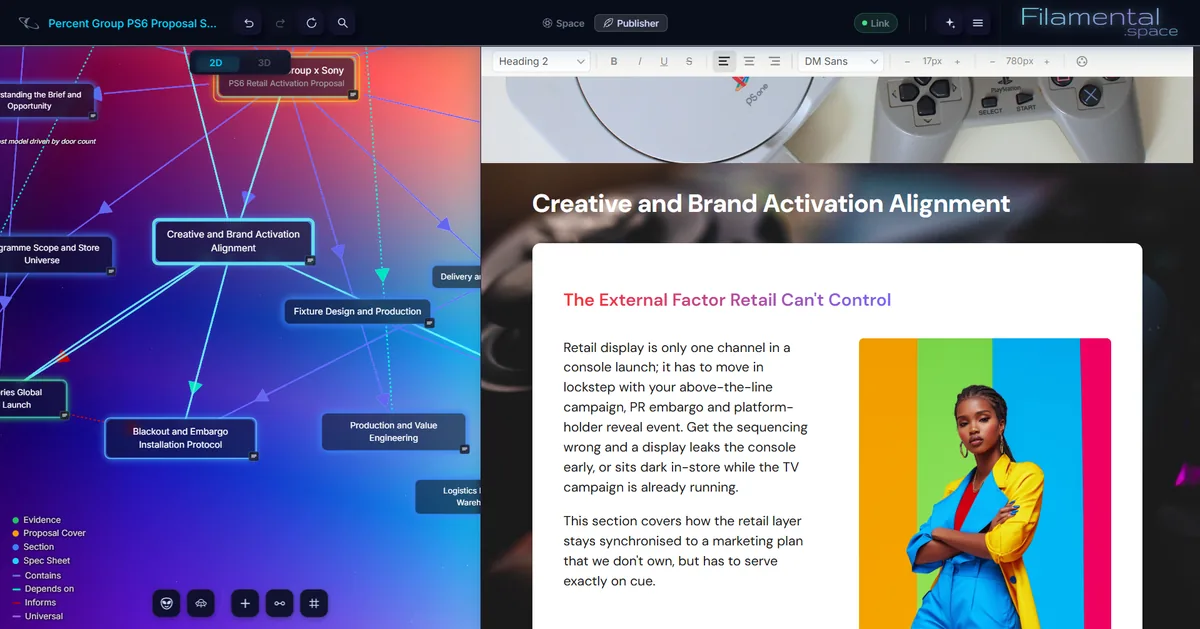
The document, and its own map The structure on the left is the contents page, and its connectors say how the sections relate.
A client proposal open in Publisher Studio. On the left the document's own structure is drawn as a map, with sections such as Creative and Brand Activation Alignment and Blackout and Embargo Installation Protocol joined by connectors labelled Contains, Depends on and Informs. On the right the same section renders as a finished page with a cover photograph, headings and a two-column layout.
At the other end

The contents page they experience

Most ways of sending work press it flat first. Here your reader gets the shape itself: they turn it, tap a node and the page opens, so they can read it in your order or go straight to what they need.

It’s read-only, it works on a phone, and there’s nothing for them to install.
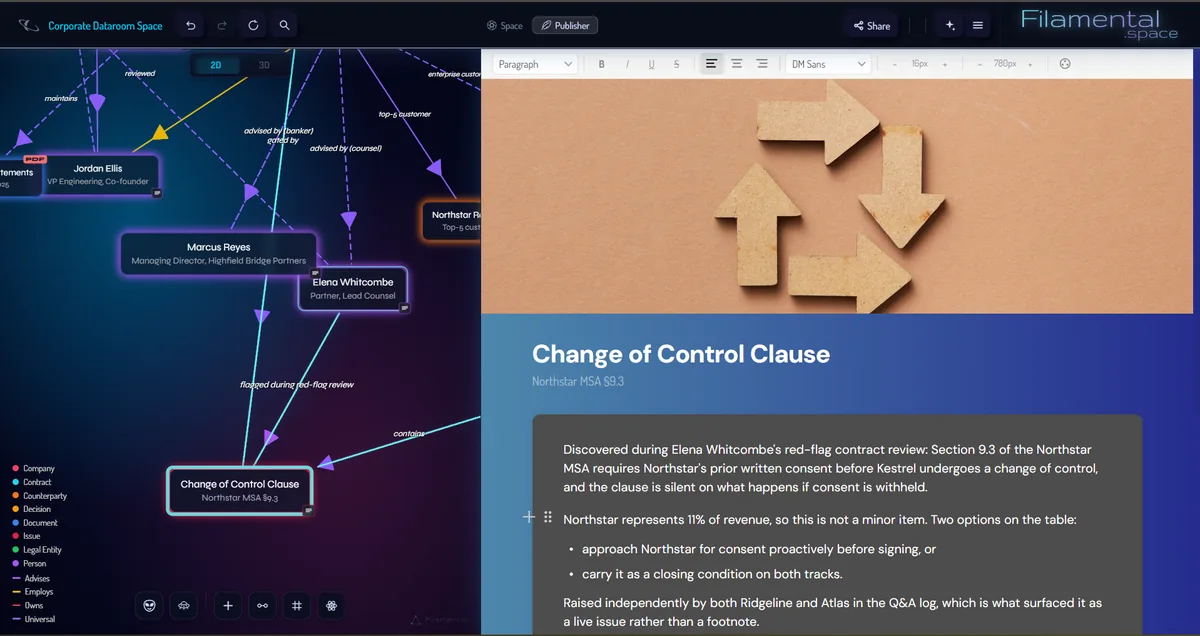
One node, both ways at once The same clause selected in the graph and published beside it, from one set of files.
One node shown two ways at once. The left half is the graph, with the Change of Control Clause node selected among the people and documents it connects to, and a legend naming each type and connector. The right half is the same node as a published page, with a cover image, its heading and subheading over a blue gradient, and the same notes set as body copy and a bulleted list.
What you hand over

A link, or a single file that’s yours outright

Both are made from a snapshot of the space as it stands when you press the button. Pick whichever suits the person waiting for it.

An encrypted link

Send a link the way you would send anything

Paste it into an email, a message or a ticket. It opens on a phone as readily as on a desktop.

  • Push an update to the same link whenever the work moves on, on Professional.
  • Revoke it at any time and it stops resolving.
  • Add an optional password if the link itself might travel further than you intended.

Expires by itself after 180 days, so nothing you shared last year is still quietly available. The free plan keeps one active at a time.

One HTML file

No infrastructure involved, including ours

The whole thing in a single file. Attach it, archive it, or put it on a memory stick and post it.

  • Works offline, and keeps working.
  • Nothing to expire, because there’s no server in the picture.
  • Attachments travel inside it rather than being left behind.

It’s yours outright and keeps working indefinitely. The download is part of Professional.

In the room

Put it on the wall and let it turn

Press Present and the structure fills the screen and turns slowly, with nothing else on it. Put it up ten minutes before you start, and by the time you begin the room already has the shape of it.

The same button sits in the corner of every link and file you send, so whoever receives it can put it up in their own meeting.
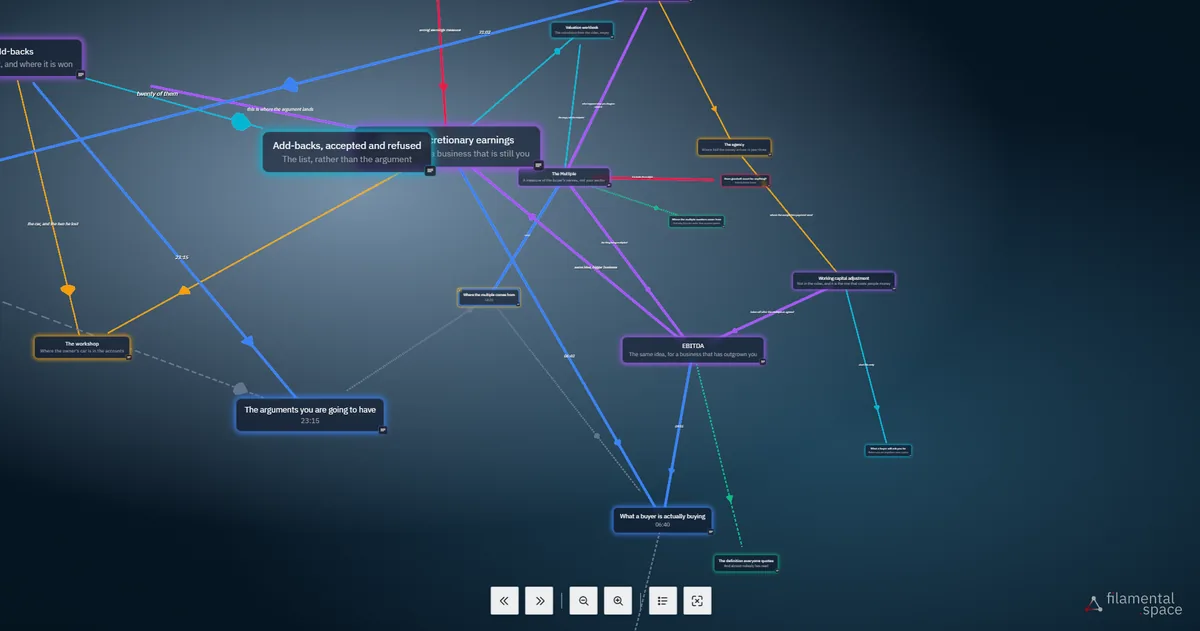
On the wall Nothing on screen but the structure and a row of controls.
The Plain Numbers companion space in Present mode, filling the screen with no panels, over a deep blue field. Named cards sit at different depths, among them Add-backs, accepted and refused, outlined in blue, Seller’s discretionary earnings, The Multiple, EBITDA, What a buyer is actually buying at six forty, The arguments you are going to have at twenty-three fifteen, The workshop, The agency, Working capital adjustment, Valuation workbook and Where the multiple comes from at fourteen twenty. Thick coloured connectors in blue, purple, orange, red, cyan and green join them, some with a short label along the line. Along the bottom is the control row: two arrow buttons for slower and faster, two magnifying glasses for further and closer, a list button for the legend and a button to leave. The filamental space wordmark sits in the bottom right corner.

Presenting from the app is part of Professional, along with the download and a second published link.

Who this is for

Build a whole document without touching a node type

Publisher Studio doesn’t need Space Studio first, or at all, and plenty of people never use it. Use it like any document editor, with pages, covers, long-form formatting and links between pages.

The way you arrange the pages becomes the contents page your reader navigates.
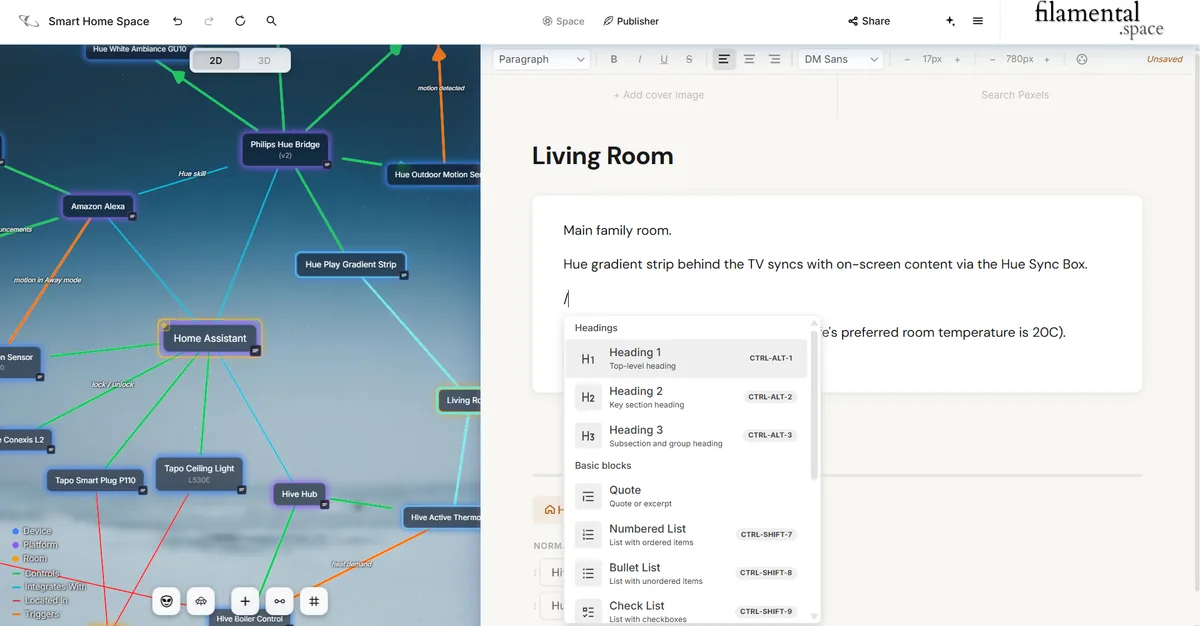
Type a slash Headings, quotes, lists and checklists. That’s all there is to learn to write a page.
A page being written in Publisher with a slash typed into the body and the block menu open beneath it. The menu is grouped, with Headings offering Heading 1, 2 and 3 against their keyboard shortcuts, and Basic blocks offering Quote, Numbered List, Bullet List and Check List. The page itself is a room in a smart home space, and the graph beside it shows the hub, the bridge, the lights and the sensors joined by connectors named Controls, Integrates With, Located In and Triggers.
Making it yours

It should look like you sent it, not like we did

Headings, body, title, page and background each take their own colour, and the background can be a gradient or an image. Covers, fonts and page width are yours to set too.

Somebody opening your work should be able to tell that a person made it, and which person.
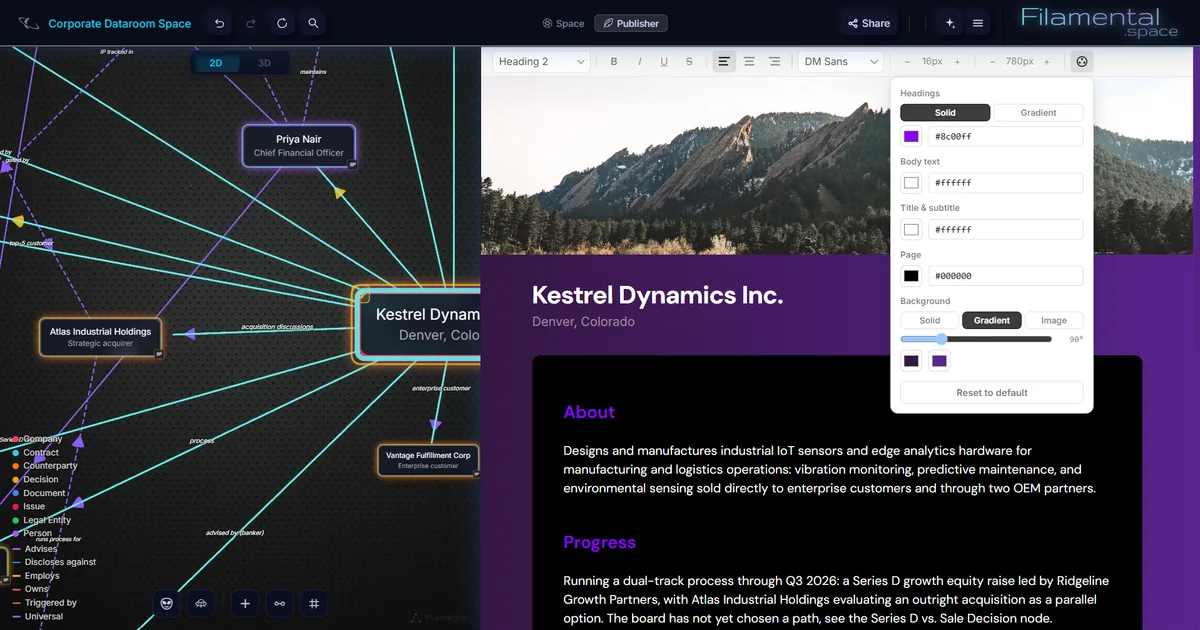
Colour, set part by part Each part takes its own colour, and this background is a two-stop gradient.
Publisher open on a corporate dataroom space with the colour controls showing. The panel sets Headings, Body text, Title and subtitle, Page and Background independently, each with its own hex field, and the background is set to a two-stop gradient at ninety degrees rather than a flat colour. Behind the panel the page it is styling carries a mountain photograph as its cover, a purple ground, magenta headings reading About and Progress, and body copy describing an industrial sensor manufacturer and a dual-track process.
What we can see

Nothing. That’s the entire answer

Snapshots are encrypted on your own machine before they go anywhere. We can’t read a shared space, with or without a password, and no setting changes that.

A password decides who gets in once they have the link. The encryption is always on.

We don’t want your data. It belongs to you.

Out loud, before you send one

Three things worth knowing

  1. It’s a snapshot, not a live feed

    What you send is the space as it was at that moment. When you’re ready for them to see the new version, you push it to the same link.

  2. A hosted link lasts 180 days

    Then it expires on its own, so nothing lingers. If you need something permanent, the downloaded file never expires, and it’s part of Professional.

  3. A link outlives your Professional trial

    Publish during your first fifteen days and your links keep working for their full 180 days after you move to the free plan, and you can still revoke them. What changes is that updating a link becomes part of Professional, and the free plan holds one link at a time. Nothing you’ve sent stops working. We won’t leave you stranded.

What it costs

One payment, and what they received stays received

Building a structure is free and always will be, and so is your first published link. What you pay for is the part that leaves your computer: a second published link, updating one you’ve sent, the file, and Present. One plan, no upselling.

We believe in ownership, so a file you’ve handed over keeps working whether or not anybody is still paying for anything.

Send one this week

The first fifteen days include all of this

No card, no account, nothing to cancel. Build something, publish it, and watch somebody open it. It won’t be your best creation, but you’ll enjoy the experience.

Platforms
Win / macOS / Linux
Personal
Free, permanent
Professional
$120 / year, or $12 / month